
Lens Data Layout

  • Feb 19, 2021 6:37 PM UTC
  • 4 replies
  • 268 views

Forum|alt.badge.img

Hi support team,

Is it possible in OpticsStudio  21.1 to set the structure of Data Lens Layout? 

The problem is that the order and the width of the columns change every time I open a new file.

i.e is it possible to set the order of the columns and their width in the layout, permanent?

Thank you for your help,

Tali M.



4 replies

Forum|alt.badge.img+2

Hi Tali

The structure of Data Lens Layout is unique to each file. 

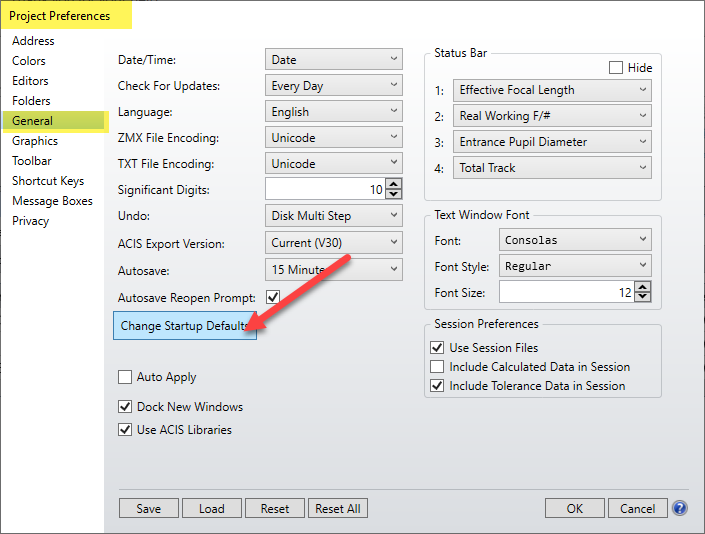
If you want to make this a permanent layout, you can navigate to Setup...Project Preferences...General. Then select Change Startup Defaults:

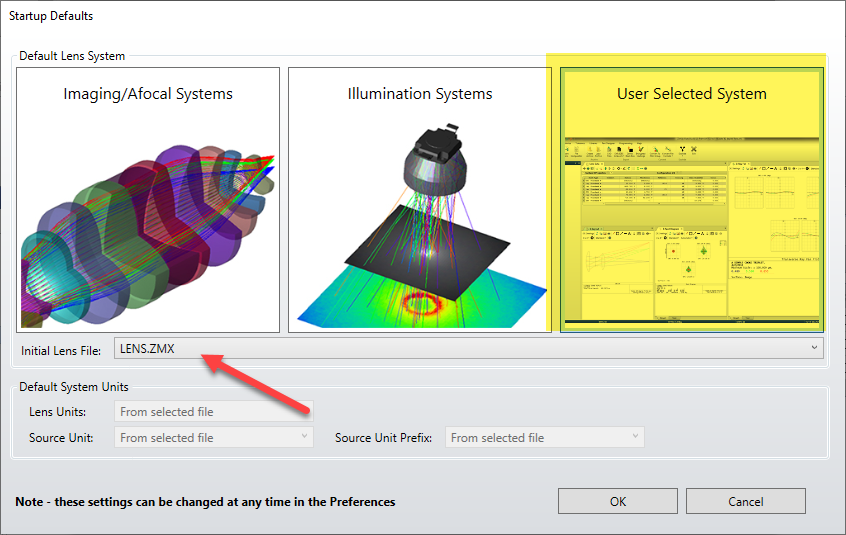
It will open a new window. Select User Selected System.
Then under Initial Lens File, select a file with the right layout.

It should each time open a new file with that layout.
I haven't tested this, so please let us know how it goes.

Thank you!

Sandrine


Forum|alt.badge.img
  • Author
  • Infrared
  • Feb 24, 2021 12:29 PM UTC

Dear Sandrine, Thank you, however, it doesn't answer my question.

I wish to fix the width of the columns since they are too narrow and I can't see the title clearly.


Forum|alt.badge.img+2

Hi Tali

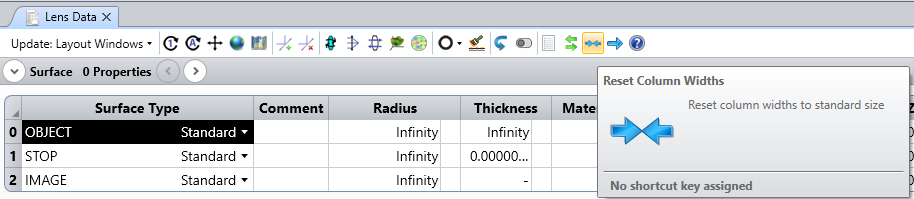
To set-up correctly the column width, there is a reset button:

Sandrine


Forum|alt.badge.img
  • Author
  • Infrared
  • Feb 25, 2021 12:44 PM UTC

Great, Thank you Sandrine.