Solved

How can I generate a plot similar to CodeV in Zemax?

  • January 20, 2026
  • 2 replies
  • 65 views

Yang.Yongtao
Fully Spectral
Forum|alt.badge.img

Hi Zemaxers

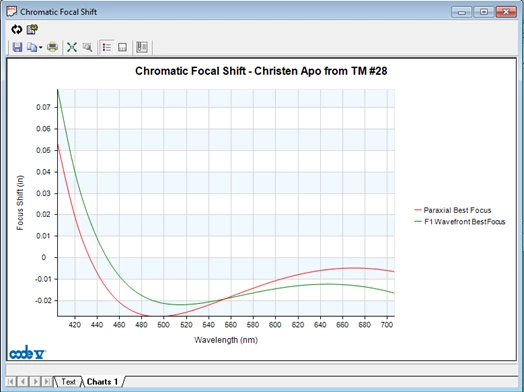
Specifically, I want to create a graph in Zemax that combines Chromatic Focal Shift and Wavefront Error Best Focus, similar to what CodeV provides.

What I have tried

Method 1

  1. Use a ZPL(Attached+Merit function) script
    ZPL Merit Function
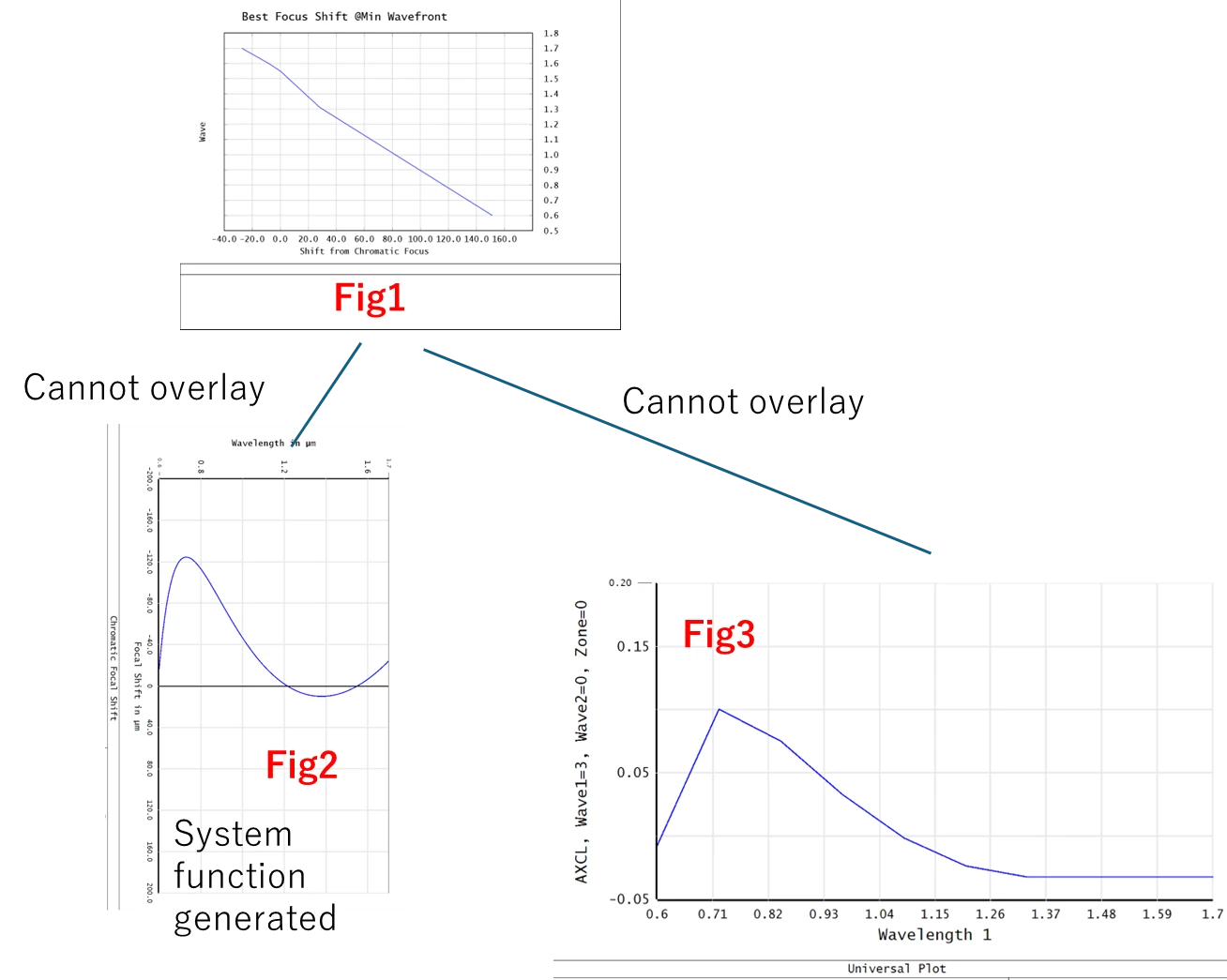
    to calculate the wavefront-error best focus and generate a plot (Fig. 1).
  2. Generate the Chromatic Focal Shift plot (System) (Fig. 2).
  3. Overlay Fig. 1 and Fig. 2.
    → This attempt failed.

My questions:

  • Is it impossible to overlay a system-generated plot with a ZPL‑generated plot?
  • The Active Overlay option is not always available—are there specific rules that determine when it works?

Method 2

  1. Use the Universal Plot feature with ZPLM data to generate the required plot.
  2. Overlay it with Fig. 3.
    → This also failed at step 1 (some operands cannot be computed).

My questions:


Best Regards


YANG


Best answer by Mike.Jones

Try this.  It does what CodeV does, but the graphics are 1980-quality.  Better to export array values to Excel where you can actually make decent looking plots.

Just my style: As you see, I always copy pertinent parts of the manual to my ZPL code so I don’t have to keep going back and forth.

Mike

==========================

# CHROMATIC_SHIFT.ZPL
OUTPUT SCREEN
PRINT

#  STORE WAVELENGTHS FROM ORIGINAL SYSTEM:

numwav = NWAV()
DECLARE wvlns, DOUBLE, 1, numwav
DECLARE wvwgt, DOUBLE, 1, numwav
primwave = PWAV()
FOR jwv,1,NWAV(),1
  wvlns(jwv) = WAVL(jwv)
  wvwgt(jwv) = WWGT(jwv)
NEXT jwv
bflsurf = THIC(NSUR() - 1)
BFL = THIC(4)

#  SET UP FOR ONE WAVELENGTH SCAN:

# SETSYSTEMPROPERTY code, value1, value2
# 200 Primary wavelength number
# 201 Number of wavelengths
# 202 Value 1 = wavelength number, Value 2 = wavelength in micrometers
# 203 Value 1 = wavelength number, Value 2 = wavelength weight

SETSYSTEMPROPERTY 200, 1     #  Primary wavelength number will be 1
SETSYSTEMPROPERTY 201, 1     #  One wavelength
SETSYSTEMPROPERTY 203, 1, 1  #  Value1 = wavelength number, Value 2 = wavelength weight
UPDATE EDITORS

nwaves = 51

DECLARE RMS_spot, DOUBLE, 1, nwaves
DECLARE RMS_OPD , DOUBLE, 1, nwaves
DECLARE waves   , DOUBLE, 1, nwaves

qw1 = 0.44
qw2 = 0.70
wvinc = (qw2 - qw1) / (nwaves - 1)
qw = qw1
FOR jwv,1,nwaves,1
  waves(jwv) = qw
  qw = qw + wvinc
NEXT jwv
  
#  QUICKFOCUS mode, centroid
#  mode 0 = RMS spot radius
#  mode 1 = spot x
#  mode 2 = spot y
#  mode 3 = wavefront OPD
#  centroid 0 = chief ray
#  centroid 1 = image centroid

FOR jwv,1,nwaves,1
  SETSYSTEMPROPERTY 202, 1, waves(jwv)
  UPDATE EDITORS
  QUICKFOCUS 1, 1
  RMS_spot(jwv) = THIC(4)
  QUICKFOCUS 3, 1
  RMS_OPD(jwv) = THIC(4)
#  FORMAT 3.0
#  PRINT jwv, 
#  FORMAT 12.5
#  PRINT waves(jwv), RMS_spot(jwv), RMS_OPD(jwv)
NEXT jwv

PLOT NEW
PLOT TITLE, "BFL vs Wavelength"
PLOT TITLEX, "Wavelength in µm"
PLOT TITLEY, "Back Focal Length in mm."
PLOT BANNER, "RMS Spot vs. RMS OPD"
#PLOT WINASPECT, type
PLOT COMM1, "Best focus RMS Spot in BLUE"
PLOT COMM2, "Best focus RMS OPD in GREEN"
#PLOT COMM3, string
#PLOT COMM4, string
#PLOT COMM5, string
#PLOT COMM6, string
PLOT RANGEX, qw1, qw2
#PLOT RANGEY, miny, maxy
#PLOT CHECK, x_increment, y_increment
#PLOT TICK, x_increment, y_increment
#PLOT FORMATX, with "%M.nf", M=total number of spaces, n=number of figures after the decimal point
PLOT FORMATX, "%5.2f"
#PLOT FORMATY, with "%M.nf", M=total number of spaces, n=number of figures after the decimal point
PLOT FORMATY, "%8.2f"
# PLOT DATA, x_array,  y_array , no. points, color,       style, options
  PLOT DATA,   waves,  RMS_spot,     nwaves,     1   #  , style, options
  PLOT DATA,   waves,  RMS_OPD ,     nwaves,     2   #  , style, options
#PLOT LINE, x1, y1, x2, y2
#PLOT LABEL, x, y, angle, size, string
PLOT GO


#  RESTORE WAVELENGTHS, BFL TO ORIGINAL SYSTEM:

SETSYSTEMPROPERTY 200, primwave           #  200 Primary wavelength number
SETSYSTEMPROPERTY 201, numwav             #  201 Number of wavelengths
FOR jwv,1,NWAV(),1
  SETSYSTEMPROPERTY 202, jwv, wvlns(jwv)  #  202 Value 1 = wavelength number, Value 2 = wavelength in micrometers
  SETSYSTEMPROPERTY 203, jwv, wvwgt(jwv)  #  203 Value 1 = wavelength number, Value 2 = wavelength weight
NEXT jwv
#  SETSURFACEPROPERTY surface, code, value1, value2
   SETSURFACEPROPERTY       4,    3, BFL
UPDATE ALL
END

2 replies

Mike.Jones
En-Lightened
Forum|alt.badge.img+3
  • En-Lightened
  • Answer
  • January 20, 2026

Try this.  It does what CodeV does, but the graphics are 1980-quality.  Better to export array values to Excel where you can actually make decent looking plots.

Just my style: As you see, I always copy pertinent parts of the manual to my ZPL code so I don’t have to keep going back and forth.

Mike

==========================

# CHROMATIC_SHIFT.ZPL
OUTPUT SCREEN
PRINT

#  STORE WAVELENGTHS FROM ORIGINAL SYSTEM:

numwav = NWAV()
DECLARE wvlns, DOUBLE, 1, numwav
DECLARE wvwgt, DOUBLE, 1, numwav
primwave = PWAV()
FOR jwv,1,NWAV(),1
  wvlns(jwv) = WAVL(jwv)
  wvwgt(jwv) = WWGT(jwv)
NEXT jwv
bflsurf = THIC(NSUR() - 1)
BFL = THIC(4)

#  SET UP FOR ONE WAVELENGTH SCAN:

# SETSYSTEMPROPERTY code, value1, value2
# 200 Primary wavelength number
# 201 Number of wavelengths
# 202 Value 1 = wavelength number, Value 2 = wavelength in micrometers
# 203 Value 1 = wavelength number, Value 2 = wavelength weight

SETSYSTEMPROPERTY 200, 1     #  Primary wavelength number will be 1
SETSYSTEMPROPERTY 201, 1     #  One wavelength
SETSYSTEMPROPERTY 203, 1, 1  #  Value1 = wavelength number, Value 2 = wavelength weight
UPDATE EDITORS

nwaves = 51

DECLARE RMS_spot, DOUBLE, 1, nwaves
DECLARE RMS_OPD , DOUBLE, 1, nwaves
DECLARE waves   , DOUBLE, 1, nwaves

qw1 = 0.44
qw2 = 0.70
wvinc = (qw2 - qw1) / (nwaves - 1)
qw = qw1
FOR jwv,1,nwaves,1
  waves(jwv) = qw
  qw = qw + wvinc
NEXT jwv
  
#  QUICKFOCUS mode, centroid
#  mode 0 = RMS spot radius
#  mode 1 = spot x
#  mode 2 = spot y
#  mode 3 = wavefront OPD
#  centroid 0 = chief ray
#  centroid 1 = image centroid

FOR jwv,1,nwaves,1
  SETSYSTEMPROPERTY 202, 1, waves(jwv)
  UPDATE EDITORS
  QUICKFOCUS 1, 1
  RMS_spot(jwv) = THIC(4)
  QUICKFOCUS 3, 1
  RMS_OPD(jwv) = THIC(4)
#  FORMAT 3.0
#  PRINT jwv, 
#  FORMAT 12.5
#  PRINT waves(jwv), RMS_spot(jwv), RMS_OPD(jwv)
NEXT jwv

PLOT NEW
PLOT TITLE, "BFL vs Wavelength"
PLOT TITLEX, "Wavelength in µm"
PLOT TITLEY, "Back Focal Length in mm."
PLOT BANNER, "RMS Spot vs. RMS OPD"
#PLOT WINASPECT, type
PLOT COMM1, "Best focus RMS Spot in BLUE"
PLOT COMM2, "Best focus RMS OPD in GREEN"
#PLOT COMM3, string
#PLOT COMM4, string
#PLOT COMM5, string
#PLOT COMM6, string
PLOT RANGEX, qw1, qw2
#PLOT RANGEY, miny, maxy
#PLOT CHECK, x_increment, y_increment
#PLOT TICK, x_increment, y_increment
#PLOT FORMATX, with "%M.nf", M=total number of spaces, n=number of figures after the decimal point
PLOT FORMATX, "%5.2f"
#PLOT FORMATY, with "%M.nf", M=total number of spaces, n=number of figures after the decimal point
PLOT FORMATY, "%8.2f"
# PLOT DATA, x_array,  y_array , no. points, color,       style, options
  PLOT DATA,   waves,  RMS_spot,     nwaves,     1   #  , style, options
  PLOT DATA,   waves,  RMS_OPD ,     nwaves,     2   #  , style, options
#PLOT LINE, x1, y1, x2, y2
#PLOT LABEL, x, y, angle, size, string
PLOT GO


#  RESTORE WAVELENGTHS, BFL TO ORIGINAL SYSTEM:

SETSYSTEMPROPERTY 200, primwave           #  200 Primary wavelength number
SETSYSTEMPROPERTY 201, numwav             #  201 Number of wavelengths
FOR jwv,1,NWAV(),1
  SETSYSTEMPROPERTY 202, jwv, wvlns(jwv)  #  202 Value 1 = wavelength number, Value 2 = wavelength in micrometers
  SETSYSTEMPROPERTY 203, jwv, wvwgt(jwv)  #  203 Value 1 = wavelength number, Value 2 = wavelength weight
NEXT jwv
#  SETSURFACEPROPERTY surface, code, value1, value2
   SETSURFACEPROPERTY       4,    3, BFL
UPDATE ALL
END


Yang.Yongtao
Fully Spectral
Forum|alt.badge.img
  • Author
  • Fully Spectral
  • January 20, 2026

Try this.  It does what CodeV does, but the graphics are 1980-quality.  Better to export array values to Excel where you can actually make decent looking plots.

Just my style: As you see, I always copy pertinent parts of the manual to my ZPL code so I don’t have to keep going back and forth.

Mike

==========================

# CHROMATIC_SHIFT.ZPL
OUTPUT SCREEN
PRINT

#  STORE WAVELENGTHS FROM ORIGINAL SYSTEM:

numwav = NWAV()
DECLARE wvlns, DOUBLE, 1, numwav
DECLARE wvwgt, DOUBLE, 1, numwav
primwave = PWAV()
FOR jwv,1,NWAV(),1
  wvlns(jwv) = WAVL(jwv)
  wvwgt(jwv) = WWGT(jwv)
NEXT jwv
bflsurf = THIC(NSUR() - 1)
BFL = THIC(4)

#  SET UP FOR ONE WAVELENGTH SCAN:

# SETSYSTEMPROPERTY code, value1, value2
# 200 Primary wavelength number
# 201 Number of wavelengths
# 202 Value 1 = wavelength number, Value 2 = wavelength in micrometers
# 203 Value 1 = wavelength number, Value 2 = wavelength weight

SETSYSTEMPROPERTY 200, 1     #  Primary wavelength number will be 1
SETSYSTEMPROPERTY 201, 1     #  One wavelength
SETSYSTEMPROPERTY 203, 1, 1  #  Value1 = wavelength number, Value 2 = wavelength weight
UPDATE EDITORS

nwaves = 51

DECLARE RMS_spot, DOUBLE, 1, nwaves
DECLARE RMS_OPD , DOUBLE, 1, nwaves
DECLARE waves   , DOUBLE, 1, nwaves

qw1 = 0.44
qw2 = 0.70
wvinc = (qw2 - qw1) / (nwaves - 1)
qw = qw1
FOR jwv,1,nwaves,1
  waves(jwv) = qw
  qw = qw + wvinc
NEXT jwv
  
#  QUICKFOCUS mode, centroid
#  mode 0 = RMS spot radius
#  mode 1 = spot x
#  mode 2 = spot y
#  mode 3 = wavefront OPD
#  centroid 0 = chief ray
#  centroid 1 = image centroid

FOR jwv,1,nwaves,1
  SETSYSTEMPROPERTY 202, 1, waves(jwv)
  UPDATE EDITORS
  QUICKFOCUS 1, 1
  RMS_spot(jwv) = THIC(4)
  QUICKFOCUS 3, 1
  RMS_OPD(jwv) = THIC(4)
#  FORMAT 3.0
#  PRINT jwv, 
#  FORMAT 12.5
#  PRINT waves(jwv), RMS_spot(jwv), RMS_OPD(jwv)
NEXT jwv

PLOT NEW
PLOT TITLE, "BFL vs Wavelength"
PLOT TITLEX, "Wavelength in µm"
PLOT TITLEY, "Back Focal Length in mm."
PLOT BANNER, "RMS Spot vs. RMS OPD"
#PLOT WINASPECT, type
PLOT COMM1, "Best focus RMS Spot in BLUE"
PLOT COMM2, "Best focus RMS OPD in GREEN"
#PLOT COMM3, string
#PLOT COMM4, string
#PLOT COMM5, string
#PLOT COMM6, string
PLOT RANGEX, qw1, qw2
#PLOT RANGEY, miny, maxy
#PLOT CHECK, x_increment, y_increment
#PLOT TICK, x_increment, y_increment
#PLOT FORMATX, with "%M.nf", M=total number of spaces, n=number of figures after the decimal point
PLOT FORMATX, "%5.2f"
#PLOT FORMATY, with "%M.nf", M=total number of spaces, n=number of figures after the decimal point
PLOT FORMATY, "%8.2f"
# PLOT DATA, x_array,  y_array , no. points, color,       style, options
  PLOT DATA,   waves,  RMS_spot,     nwaves,     1   #  , style, options
  PLOT DATA,   waves,  RMS_OPD ,     nwaves,     2   #  , style, options
#PLOT LINE, x1, y1, x2, y2
#PLOT LABEL, x, y, angle, size, string
PLOT GO


#  RESTORE WAVELENGTHS, BFL TO ORIGINAL SYSTEM:

SETSYSTEMPROPERTY 200, primwave           #  200 Primary wavelength number
SETSYSTEMPROPERTY 201, numwav             #  201 Number of wavelengths
FOR jwv,1,NWAV(),1
  SETSYSTEMPROPERTY 202, jwv, wvlns(jwv)  #  202 Value 1 = wavelength number, Value 2 = wavelength in micrometers
  SETSYSTEMPROPERTY 203, jwv, wvwgt(jwv)  #  203 Value 1 = wavelength number, Value 2 = wavelength weight
NEXT jwv
#  SETSURFACEPROPERTY surface, code, value1, value2
   SETSURFACEPROPERTY       4,    3, BFL
UPDATE ALL
END

 

Hi Mike,

Thanks!
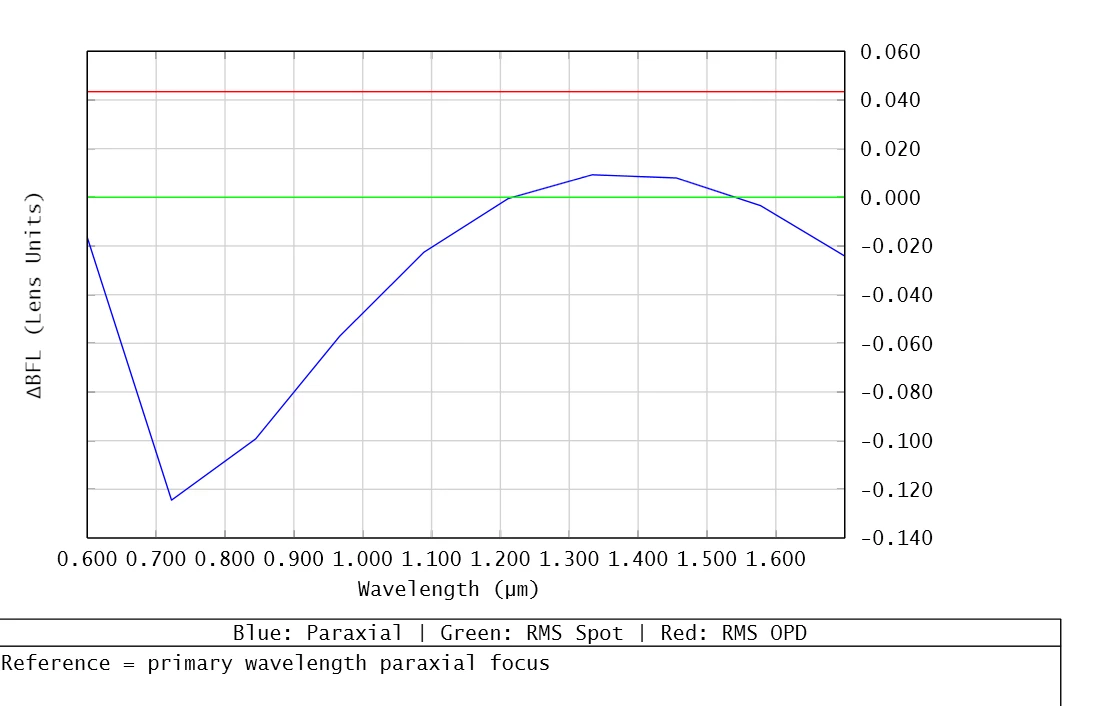
With your help, I managed to write a new ZPL as shown below.

I’m just wondering—does Quick Focus work the same way as optimizing with a Spot Merit function? It feels a bit tricky…

# =========================================================
# CHROMATIC_FOCAL_SHIFT_PRIMARY_PARAXIAL_REFERENCE_FINAL.ZPL
# =========================================================
OUTPUT SCREEN
PRINT

# =========================================================
# 1) Backup wavelength table & BFL
# =========================================================
numwav   = NWAV()
primwave_start = PWAV()
primwave_value = WAVL(primwave_start)
primwave = PWAV()

DECLARE wvlns, DOUBLE, 1, numwav
DECLARE wvwgt, DOUBLE, 1, numwav

FOR j, 1, numwav, 1
  wvlns(j) = WAVL(j)
  wvwgt(j) = WWGT(j)
NEXT j
image_surf = NSUR()
bfl_surf   = image_surf - 1
orig_bfl   = THIC(bfl_surf)

# =========================================================
# 2) Wavelength scan definition
# =========================================================
nwaves = 10
pnwaves = nwaves+1
w1 = 0.6
w2 = 1.70
dw = (w2 - w1) / (nwaves - 1)

DECLARE waves     , DOUBLE, 1, nwaves
DECLARE dBFL_parax, DOUBLE, 1, nwaves
DECLARE dBFL_spot , DOUBLE, 1, nwaves
DECLARE dBFL_opd  , DOUBLE, 1, nwaves


# =========================================================
# 3) PRIMARY WAVELENGTH PARAXIAL FOCUS (REFERENCE)
# =========================================================


SETSYSTEMPROPERTY 201, pnwaves
SETSYSTEMPROPERTY 202, pnwaves, primwave_value
SETSYSTEMPROPERTY 200, pnwaves

QUICKFOCUS 0, 0
bfl_ref_parax = THIC(bfl_surf)

w = w1
FOR i, 1, nwaves, 1
  waves(i) = w
  SETSYSTEMPROPERTY 202, i, waves(i)
  SETSYSTEMPROPERTY 203, i, 1
  
  # ---------- RMS Spot focus ----------
  QUICKFOCUS 0, 0
  bfl_spot = THIC(bfl_surf)
  dBFL_spot(i) = bfl_spot - bfl_ref_parax

  # ---------- RMS OPD focus ----------
  QUICKFOCUS 3, 0
  bfl_opd = THIC(bfl_surf)
  dBFL_opd(i) = bfl_opd - bfl_ref_parax
  
  w = w + dw
NEXT i


axcl = OCOD("AXCL")
FOR i, 1, nwaves, 1
  # ---------- Chromatic focus shift ----------
  
    ! OPEV(code, wave1=prim, wave2=i, data1=zone, data2..4=0)
  dBFL_parax(i) = OPEV(axcl, pnwaves, i, 0, 0, 0, 0)
  
  PRINT "i", i
  PRINT "wave", WAVL(i)
  PRINT "dBFL_parax", dBFL_parax(i)
NEXT i

PRINT "pnwaves", pnwaves
PRINT "primwave_value", primwave_value

# =========================================================
# 4) Plot: Chromatic focal shift
# =========================================================
PLOT NEW
PLOT TITLE,  "Chromatic Focal Shift (Primary Paraxial Reference)"
PLOT TITLEX, "Wavelength (µm)"
PLOT TITLEY, "ΔBFL (Lens Units)"
PLOT BANNER, "Blue: Paraxial | Green: RMS Spot | Red: RMS OPD"
PLOT COMM1,  "Reference = primary wavelength paraxial focus"
PLOT RANGEX, w1, w2

PLOT DATA, waves, dBFL_parax, nwaves, 1
PLOT DATA, waves, dBFL_spot , nwaves, 2
PLOT DATA, waves, dBFL_opd  , nwaves, 3
PLOT GO


END