

Solved

2025 R2.04 Setting IGNM to Ignore Rows is not applied correctly

  • January 8, 2026
  • 2 replies
  • 48 views

Forum|alt.badge.img

Has anyone noticed any issues with using IGNM operand or any other operand in MFE? 
I set IGNM of Surfaces A → B to “1”. And I sometimes see the rows disabled and other times not. There is something not quite right and I am not doing anything complex.

Feels like a bug.  Can someone confirm here if there are experiencing the same?

Cheers!

Best answer by MichaelH

Hey Asuku,

Can you provide a little more context?  What version of OpticStudio are you using?  What other operands do you have in the MCE?  How many configurations do you have?  What surface type are you trying to ignore & is this the Stop surface?  I remember some weird behavior like this before but I think this was many years ago.

When I try this on the Double Gauss using IGNM, I see the correct behavior using both OpticStudio 24R2 & 25R2.

2 replies

MichaelH
Ansys Staff
Forum|alt.badge.img+2
  • Ansys Staff
  • Answer
  • January 10, 2026

Hey Asuku,

Can you provide a little more context?  What version of OpticStudio are you using?  What other operands do you have in the MCE?  How many configurations do you have?  What surface type are you trying to ignore & is this the Stop surface?  I remember some weird behavior like this before but I think this was many years ago.

When I try this on the Double Gauss using IGNM, I see the correct behavior using both OpticStudio 24R2 & 25R2.


Forum|alt.badge.img
  • Author
  • Fully Spectral
  • January 12, 2026

Hello ​@MichaelH : I debugged my case further and realized my mistake. 

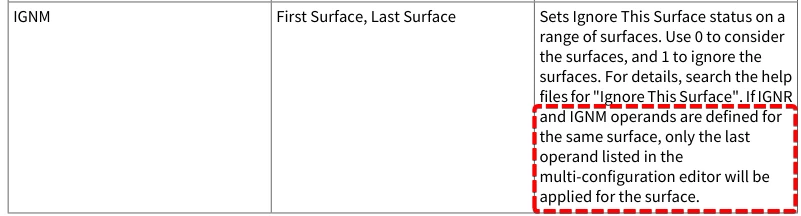
I had IGNM/IGNR operands defined for the same surface listed more than one time in the MFE, and as per documentation, only the last operand listed in the multi-configuration editor will be applied for the surface.


Once I corrected this, the problem disappeared. False alarm, OS IGNM/IGNR operands are behaving as expected. User error.


Cheers!